



 Full Games List
 Featured Games
 New Games
 Reviews
 Media
Media Images
 Blogs
Blogs Game Updates
 Images Feedback Summary
 Game Design Highlights
 Tutorials
 Articles
 Scripts
 Utilities / Plugins
 Resources
 Engines
 Engine Bulletins
 What is Makerscore?
 Past Events
 Achievements
 Misaos
 Forums
 Chat
Chat New to RMN?
 Full Store List
 RMN Music Pack (free)



 Profile
 Locker
 Play Lists
KILLER WOLF'S PROFILE
Killer Wolf

1235
 Close
Close
When you're bound by your own convictions, a discipline can be your addiction.
Search
Filter
 All
All Game Pages
 User Statuses
 How to fake a First Person view for your (MAKER NAME HERE) games!
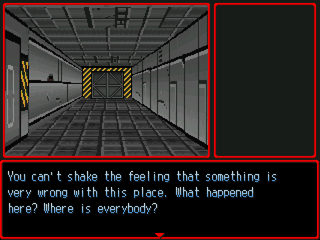
This tutorial is geared towards Rm2k(3), but should be feasible for any maker that uses terrain id, or a comparable function. At the end, I’ll suggest a method for porting this ‘system’ into Multimedia Fusion 2, but right now I’m assuming Rm2k3.
Getting the most out of this tutorial requires only a very basic understanding of the Show Picture command, Terrain ID, and a bit of busy work.
So, you like retro gaming, huh? You’ve got a nagging voice in the back of your head telling you that dungeon crawler of yours might look really interesting if you could put the player’s eyes in the main character’s head.
Ok, so how are you going to go about it? First, I’ll tell you what NOT to do.
Every time I attempted this sort of display for a game, I began with a critical error. I picked up a piece of graph paper and started marking my rooms out. Then, I started putting things together. I’d plan on a depth of three cells, and I’d go about setting up the wall data for each possible direction for each possible cell, based on my lovely graph paper cartography.
Needless to say, I always got about four or so rooms in before deciding I wasn’t quite masochistic enough to continue. I’ve started and given up on this type of project no less than six times.
Enter Terrain Ids, the beam of sunlight breaking through that cloud formation overhead.
A brief word on Terrain Id: In Rm2k(3), you can set Terrain ID values for each tile in your tile set. You can store these values into variables based on your character’s position, take a reading for a specific tile from a set of x and y coordinates, and use them to trigger pretty much any function you need.
The basic idea here is to make use of the map, taking terrain id values to supply your show picture events with the info they need to place your walls. It is a fast process, and best of all, it literally lets you DRAW YOUR ‘3D’ MAPS IN THE DEFAULT RM MAP EDITOR!
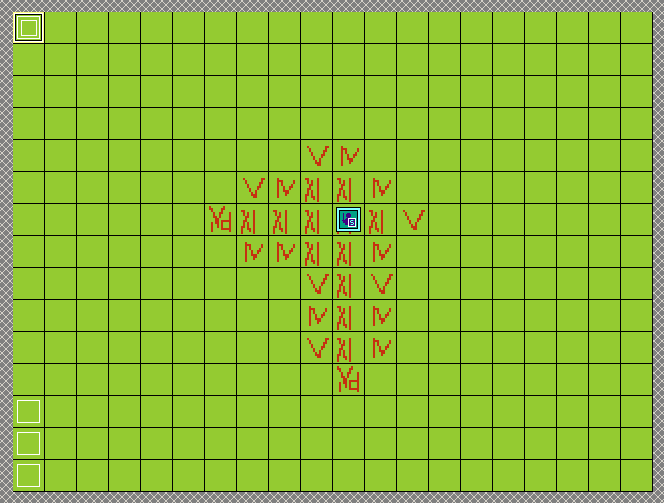
What the hell is going on in that shot? We’re getting to that, so hold onto your hats.
The first step is configuring your terrain ids. Lets start with a basic handful of useful types. Lets use id 1 for blank space, 2 for wall type a, 3 for wall type b, 4 for wall type a with a door, and 5 for the ground. You need at least two variations for each wall type. By placing them next to each other they will cycle as the player moves and this helps to reinforce the illusion of traveling in a first person environment.
Another step that helps sell the movement illusion is using alternating versions of your ceiling and floor pictures. I’m using a quick solution, which just adds to a variable when the character moves forward or backward. If the variable is 0, one set of ceiling/floor show, if it is 1, the other set is displayed. Check for when the variable is greater than 1 and reset it to 0. Congratulations. You now have a cycling floor.
Next, we need a game piece to move around our board, because that cycling floor won’t make much sense if you’re not actually mobile at the time. I don’t use the hero event for this because it isn’t conducive to the control style I’m shooting for. I call this event Blip. I set its function to record its current x and y value in the parallel event I use for tracking player input.
Since we’re sticking with the three cell depth of view, we need some events to act as the player’s visual field. This is one of those busy work segments, unfortunately. There is probably a more streamlined way to do this, but this is what I’m currently using. You derive the x and y coordinates for each section within the player’s sight, and store the terrain id of the corresponding tiles.
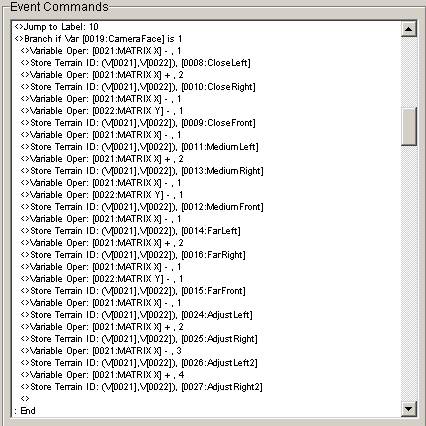
This replicates the player’s cone of vision. You need to set one version up for each of the four directions. It is important that you get the spatial relationships right. (Trust me on this one, I screwed up by trying to copy paste my right and left iterations only to find that my walls flipped positions when I ran the game!)
You now have a bunch of stored terrain ids. What do you do with them?
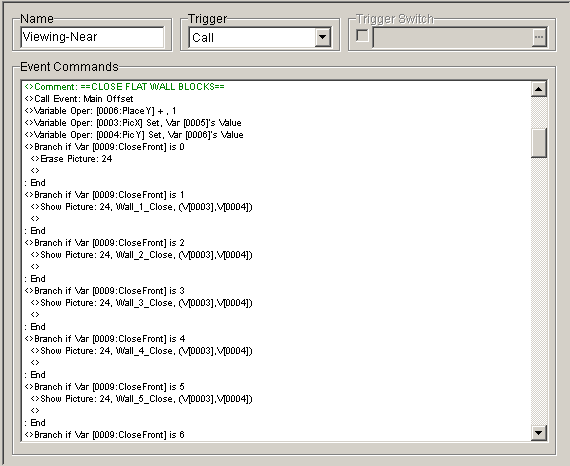
This section is kind of busywork intensive. You need to figure out where you want your images to display on the screen. Once you have the x,y value for the center of your intended display, you’re in business.
I use a single size image for each wall type and position (left angle, center, right angle), and scale it through the show picture commands. Because of the angle I chose, my wall sizes do not scale exactly, so I was required to use an offset system to get them to stitch together properly, giving the illusion of depth.
I store my intended x,y for the center of the display into a pair of variables, then I store them in a second pair of variables that I actually use in the picture display commands. This explains the Call Common event Main Offset from the above screen.
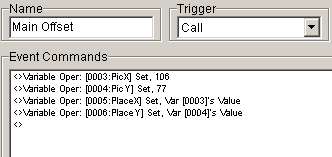
A lot of testing goes into getting your objects placed correctly onscreen. I’m using an old stock version of Rm2k3 that has a 40 picture limit. My system uses a maximum of around 32 images at a time.

My system currently finds the ids for every tile in the visual range, even if they are hidden by other objects. At first blush, it might seem like a feat of bad optimization, but it allows me to include things like transparent walls.
Now, lets take a moment to talk about movement. We have to get blip to move around, don’t we? I go with what I guess we can call tank controls. Pressing the directional key up moves “forward.” Pressing left and right pan the view in those directions. Pressing down moves “backwards.”
I set the default view to “North”. I call this 1 in my Camera Facing Variable. Pressing the right arrow increases this number by one, pressing the left arrow decreases it by one. Follow up your “rotation” directional key conditions with one that sets Camera Facing to 1 if it is greater than 4, and 4 if it is less than 1.
In the conditions for when the Inkey variable is equal to 1 or 4 (forward or backward), I have triggers for each possible Camera Facing. You can still use passability settings for your tiles to control where blip is allowed to go.
Okay, now we have the basic shell. We can draw a map in the editor using the terrain id for our empty/floor space. Then, we just have to make sure to set up alternating wall types to make the movement look good.
But, how are we going to handle objects that we need to trigger? I mean, it will be a pretty pointless dungeon if you can’t open chests, hack keypads, go through sliding doors, etc.
For this, I use a separate event called an Object Finder. It checks for when blip is at certain positions and allows for the player to interact with the environment. Since I’m trying to keep the number of parallel events running at any given time as low as I can, I set the condition to either blip’s x or y value being equal to the object’s. In the event page, I set a condition using the remaining position variable. If you’re going to have multiple objects for the player to interact with on a given x or y axis, you can stack them together to save pages.
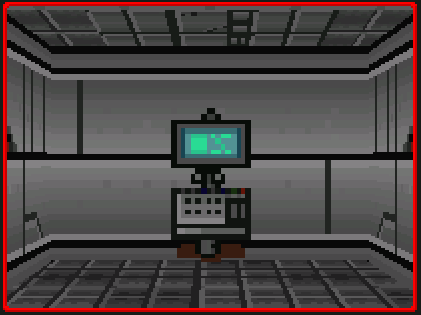
I use a variable to for the type of object being displayed, and the name for an unused Hero slot to store position information for the objects in regular expressions. FrontCloseCn means Front Close Center, etc.
I have a separate set of show picture events for objects. The object type for the kiosk is 5. Object place is CloseFrontCn. This combination triggers the show picture command for the kiosk in the center of the player’s view.
Now we have an area we can move around in, and some stuff to do in it. This is going pretty good. One problem though… fake first person exploration can get a little disorienting. Sometimes you might spin around an extra time than you meant to, and you might not be able to tell that you’re actually looking down the wrong hallway. Some kind of overhead map would be a godsend at this point, no?
But damn, we’re using close to our picture ceiling. Problem?
Not a problem. We have a built in map function, that is if we planned for it. All you have to do to get a top down view of your environment is to erase all the pictures. Ugh! You’re showing your naked level! Cover that up, man.. or at least put some tiles on there to make it look more mappish.
Wait, so now I have to draw a regular map to have my 3d map? Why not just do the normal Rm2k3 ¾ overhead thing? Can you answer me that, wise guy?
Sure. Go play a game with a 20x15 map. Feels… small doesn’t it? Claustrophobic, almost. Now, check out the tutorial’s visual aide again. That is a tiny damn map… but it feels bigger than it really is, doesn’t it?
Then again, maybe that part is just me. Let’s not dwell, although I would like to point out that you can tint your screen to black and teleport your hero location to blip’s current location to keep the screen centered on your current location if you’re using a map larger than 20x15. Just remember to tint the screen back to normal when you’re ready to show off that map.
I mentioned how I’m trying to keep parallel hell to a minimum earlier. I guess it is time to expand on that. Most of the time the game is running, there is only one parallel event in use by the ‘system’ I’ve outlined here. It makes calls to map events (object finder) and common events (View Near, View Medium, View Far, Object View). During the map option, a couple of parallel events are turned on to block the main routine from calling the show picture series.
Being able to interrupt or bypass the regular translation of terrain id to wall graphics is important if you want to be able to animate a door opening.
Now, for the issues. The way I have it set up right now, I actually separate placing objects and interacting with them into two different events, called from different places within the single main parallel.
The way my events are set up, the object placement and attending show picture commands have to occur before the Show Picture sequence for the level geometry is called in order for it to show up at the same time. The problem is that if you put the interaction call in the same place, there will be ocassions where you’re getting the message for an interaction in a room which hasn’t been displayed yet. The workaround is easy enough.
The other big issue you’ll probably notice is some missing wall geometry in the large central room. This is due to me still not liking the solution I came up with for open spaces yet. It is still a little glitchy, so I cut it out of the example.
I figured instead of just posting reams of event code, I’d give you a brief overview to explain everything that is going on in the example project. Feel free to tinker around with it. Get a feel for drawing maps in the editor and let me know if you find any more disappearing wall bugs (other than the open room fix I mentioned right above here).
Of course, you’re limited to just wall types 4,5,15,and 16 for sample purposes, with walls 15 and 16 being a closed door and an open door, respectively.

This last section will touch briefly on porting of this system over to MMF2.
If you set up a grid of active objects with different values written into one of their onboard variables to represent different wall types, and moved a player object around the grid, you can accomplish pretty much the exact same effect. In all actuality, you could even make things easier for yourself by doing this. You could set the objects to only become visible once you’d passed over them which would be a much easier way of revealing more of the map as you go than how it would have to be done in one of the rms.
Visual Aid
 NaGaDeMo
As soon as my download is approved, I'll be submitting me demo for Breach:Awakening.
EDIT: Submitted!
Breach: Awakening
EDIT: Submitted!
Breach: Awakening
 The Screenshot Topic Returns
Is that one guy attempting a drive-by on the fox, or just flipping him off while wearing an incredibly reflective ring?
Polymorphous Perversity (18+ NWS)
"The right to swing your fist ends where the other person's nose begins." Freedom of Speech and Freedom from having Freedom of Speech turned against you are two contrary ideas.
As a musician/author/artist, I would make the argument that all "art" has a right to exist, while acknowledging that "art" is an incredibly subjective term. I would not want my work to be censored, so it would be hypocritical of me to advocate the censoring of pieces I do not agree with. On paper, that is a fine stance, in practicality, not so much.
An external example: The "artist" who had a dog starve to death as an art installation. As a person who has always counted dogs as members of the family, that idea sickens me. I would not go to see it, I would not support the museum/gallery/whatever that hosted the installation, nor would I feel compelled to cross their threshold for any other exhibit.
The only way I would defend such an installation as art would be if I could stage my own installation piece, namely the beating to death of the "artist" responsible for the dog's slow agonizing demise. The way laws are structured, that is not currently an option.
After that moment of venting, I have to go ahead and say that, unfortunately, Johnny Dog Snuff does have a right to make his art.
The line can't be set at "Censoring what I like is a crime, censoring what I don't like is AWESOME."
This is not an attack. I'm not defending the portrayal of transgendered characters. I cannot control the rest of the world, unfortunately. All I can control are my reactions to it, theoretically.
I did play a little bit of the game last night, out of simple curiosity. It is not a very good game. Most of the actions the player is allowed/encouraged to take appear to have no effect. From a gameplay standpoint, one would hope that the "stick it in anything that moves, and even things that are rooted to the ground" mechanic would help you in some way.
As far as I can tell, it doesn't. The game's steadily increasing Horny Meter doesn't seem to respond to any situation outside of combat (this statement may be in error, it is possible that it is a bug, that the acts DO lower the meter, but not fast enough to keep up with its steady increase... or I just didn't notice during my short test play).
Pointless, repetitive gameplay. Maybe that is the high idea behind the game, that sex, without the associated biological imperative is a pointless, repetitive act? Does claiming recreational sex is pointless, outside of personal gratification, also constitute a jab at same sex couples, or any permutation thereof? I don't know.
There is a post on the host site about how the game has a diagnosis mode. The example the developer uses is the Homosexuality diagnosis, which tests for how often the player engages in optional male-male couplings. Calunio goes on to explain the metrics he uses, and his data gathering, making it sound very efficient and clinical, but it comes off as prurient at the same time with the example that is repeated touted during the dissertation is the Homosexuality score.
It has been said that all art is self portraiture, so something could be said about the dichotomy between an educated scientist and his flip side, the adolescent giggling in the bedroom as he explores his body.
Perhaps it is the Freudian nature of the game that is to blame? I doubt we would see a cave of Transsexuals in a Jungian game.
In fact, the game could be an attempt at integrating said sates (namely the educated scientist and the giggling adolescent) by treating a very juvenile approach to the subject with a very clinical data metric?
As a musician/author/artist, I would make the argument that all "art" has a right to exist, while acknowledging that "art" is an incredibly subjective term. I would not want my work to be censored, so it would be hypocritical of me to advocate the censoring of pieces I do not agree with. On paper, that is a fine stance, in practicality, not so much.
An external example: The "artist" who had a dog starve to death as an art installation. As a person who has always counted dogs as members of the family, that idea sickens me. I would not go to see it, I would not support the museum/gallery/whatever that hosted the installation, nor would I feel compelled to cross their threshold for any other exhibit.
The only way I would defend such an installation as art would be if I could stage my own installation piece, namely the beating to death of the "artist" responsible for the dog's slow agonizing demise. The way laws are structured, that is not currently an option.
After that moment of venting, I have to go ahead and say that, unfortunately, Johnny Dog Snuff does have a right to make his art.
The line can't be set at "Censoring what I like is a crime, censoring what I don't like is AWESOME."
This is not an attack. I'm not defending the portrayal of transgendered characters. I cannot control the rest of the world, unfortunately. All I can control are my reactions to it, theoretically.
I did play a little bit of the game last night, out of simple curiosity. It is not a very good game. Most of the actions the player is allowed/encouraged to take appear to have no effect. From a gameplay standpoint, one would hope that the "stick it in anything that moves, and even things that are rooted to the ground" mechanic would help you in some way.
As far as I can tell, it doesn't. The game's steadily increasing Horny Meter doesn't seem to respond to any situation outside of combat (this statement may be in error, it is possible that it is a bug, that the acts DO lower the meter, but not fast enough to keep up with its steady increase... or I just didn't notice during my short test play).
Pointless, repetitive gameplay. Maybe that is the high idea behind the game, that sex, without the associated biological imperative is a pointless, repetitive act? Does claiming recreational sex is pointless, outside of personal gratification, also constitute a jab at same sex couples, or any permutation thereof? I don't know.
There is a post on the host site about how the game has a diagnosis mode. The example the developer uses is the Homosexuality diagnosis, which tests for how often the player engages in optional male-male couplings. Calunio goes on to explain the metrics he uses, and his data gathering, making it sound very efficient and clinical, but it comes off as prurient at the same time with the example that is repeated touted during the dissertation is the Homosexuality score.
It has been said that all art is self portraiture, so something could be said about the dichotomy between an educated scientist and his flip side, the adolescent giggling in the bedroom as he explores his body.
Perhaps it is the Freudian nature of the game that is to blame? I doubt we would see a cave of Transsexuals in a Jungian game.
In fact, the game could be an attempt at integrating said sates (namely the educated scientist and the giggling adolescent) by treating a very juvenile approach to the subject with a very clinical data metric?
Polymorphous Perversity (18+ NWS)
Again, I've been too busy working on my own NaGaDeMo submission to take the time and try this out on my own, but from what I saw in the second video, I was a little surprised. The whole Polymorphous Perversity concept has to do with the way children start out able to derive pleasure from anything, without knowledge of social/religious enforced morals, etc...
The player appears to take the role of someone thrust into a new world, in essence, a "child." Okay, I get it so far.
BUT, the way that the transgendered characters seem to be treated indicates a bias within the game's world, if not within the developer, which sort of defeats the purpose. The "child" is learning a bit too quickly, it would seem. You are free to experiment and do anything, there is no distinction between you, your excretions, and even the beasts of the field - however, Transgendered people go over there.
The player appears to take the role of someone thrust into a new world, in essence, a "child." Okay, I get it so far.
BUT, the way that the transgendered characters seem to be treated indicates a bias within the game's world, if not within the developer, which sort of defeats the purpose. The "child" is learning a bit too quickly, it would seem. You are free to experiment and do anything, there is no distinction between you, your excretions, and even the beasts of the field - however, Transgendered people go over there.
Polymorphous Perversity (18+ NWS)
I haven't tried the game yet either, but I had a thought while watching the lets play/try: I think the nature of the game is somewhat defeated by someone recording themselves playing it for the purpose of showing other people. I think we all tend to edit, to some degree, what we know others will see. If the idea of the game is to present temptation/opportunity without oversight, making a video of yourself playing sort of defeats that and may sub-consciously alter how the experience is perceived.
And yeah, a "think of Margaret Thatcher, in a thong, eating a kidney pie" trick to control how long one can hold out against stimulation might be a better fit than grabbing a quick nap.
I used to square the numbers from 10 to 30 in my head when I needed performance enhancing distraction.
And yeah, a "think of Margaret Thatcher, in a thong, eating a kidney pie" trick to control how long one can hold out against stimulation might be a better fit than grabbing a quick nap.
I used to square the numbers from 10 to 30 in my head when I needed performance enhancing distraction.
The Screenshot Topic Returns
The screens look nice, with two exceptions:
In the first screen, the color-edited treetops and shrubs look much sharper. It makes the trees themselves look faded and out of place.
The battlers in the last screen really clash with the enemies, or vice versa.
My favorite one is the second screen, the one with the gate. If some of those pieces are original work (I don't recognize them), then they look really well done! Although, the tops of the spires on either side of the gate proper look like they were either cut off, or somehow go under the building.
In the first screen, the color-edited treetops and shrubs look much sharper. It makes the trees themselves look faded and out of place.
The battlers in the last screen really clash with the enemies, or vice versa.
My favorite one is the second screen, the one with the gate. If some of those pieces are original work (I don't recognize them), then they look really well done! Although, the tops of the spires on either side of the gate proper look like they were either cut off, or somehow go under the building.
What is up with all the NAMES people come up with for their games?
My current project is named Breach:Awakening. These two words have no significance to each other, or at least it appears that way. Within the context of the story, though, they make perfect sense. Seeing as the game page opens with a blurb from the intro about some kind of accident at an important facility, and I detail that there is demon capturing/summoning, someone should be able to put together that there is a breach in something (containment, perhaps?), and that something (that was being contained, maybe?) is waking up and that this is probably not a good thing!
My on again, off again western? "Way of the Gun"
My on again, off again cyberpunk thing? "Cybernoir" (okay, that one I kind of phoned in)
I do a lot of eye-rolling at some of the names here, and to be honest it has nuked my interest in a few games. Your game's name should be like its handshake? If your game met a bunch of other games at a party, would they all laugh about your game's name behind its back? Maybe that should be the litmus test for game name insanity.
My on again, off again western? "Way of the Gun"
My on again, off again cyberpunk thing? "Cybernoir" (okay, that one I kind of phoned in)
I do a lot of eye-rolling at some of the names here, and to be honest it has nuked my interest in a few games. Your game's name should be like its handshake? If your game met a bunch of other games at a party, would they all laugh about your game's name behind its back? Maybe that should be the litmus test for game name insanity.
The Screenshot Topic Returns
The Screenshot Topic Returns
author=Dyhalto
@killerwolf
Her hip is off. It's like her spine was disconnected and shuffled backward a bit, or like she's a lamia. Try sliding her torso right one or two pixels and trimming the belt & waist.
Thanks! I knew something was a little off.
Lotus_Games/Deathmetal -
I think the reason the charsets seem so jarring is that they lack any shadow pixels of their own. With everything else in the screen throwing fairly realistic shadows, the shadow-less character sets just seem a little too superimposed.
Kentona -
Great screens! They make me feel about eight or nine years old again, which doesn't happen that often.
Another screen from Breach:Awakening. This time, part of the intro:

 Games - Tester
 Games - Other
